Product2 min read

Send a fix to Linear, and see your team's progress

Connect the Proofsource Linear app once. Any fix becomes a Linear issue with the problem, the AI answers, the pages and the fix, and the issue's state and comments come back onto the fix.

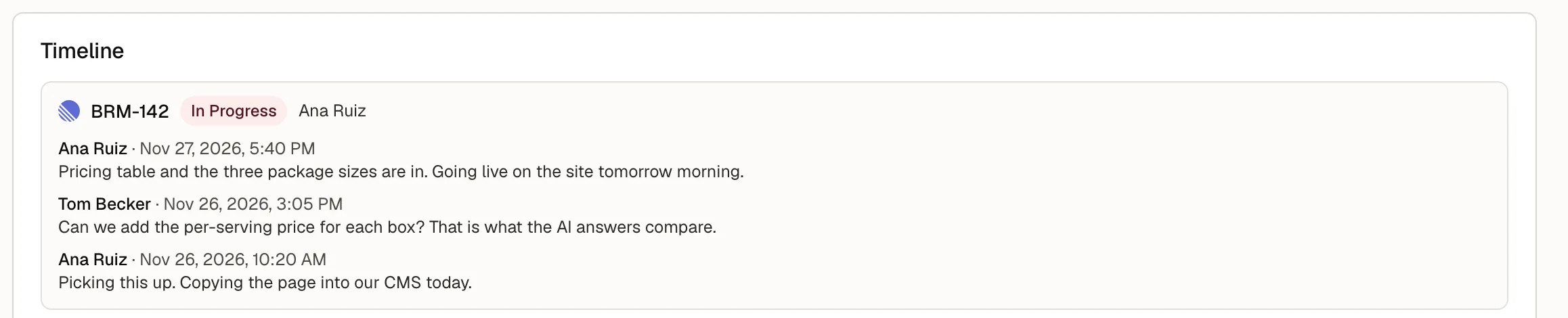
On the fix's Timeline: BRM-142, In Progress, Ana Ruiz, and the newest comments from Linear with who wrote them and when.
The Linear issue on its fix: state, who has it and the newest comments. Sample data.

Your developers live in Linear. Now a fix goes there in one click, and you never chase them for an update: their progress shows on the fix.

From fix to issue

  1. 1Connect Linear once
    Integrations, Hand off to your team: Linear, Connected.
  2. 2Create a Linear issue
    Hand it to my team on a fix, with the Create a Linear issue button.
  3. 3Pick the team, confirm
    Linear team Web picked, and the question: Create an issue in Web with the problem, the AI answers that show it, the pages and the fix? Create issue or Cancel.
  4. 4Open it in Linear
    Hand it to my team now shows Open BRM-142 in Linear, with when it was sent.
Connect once, then any fix with a written page goes to Linear after you confirm. Sample data.
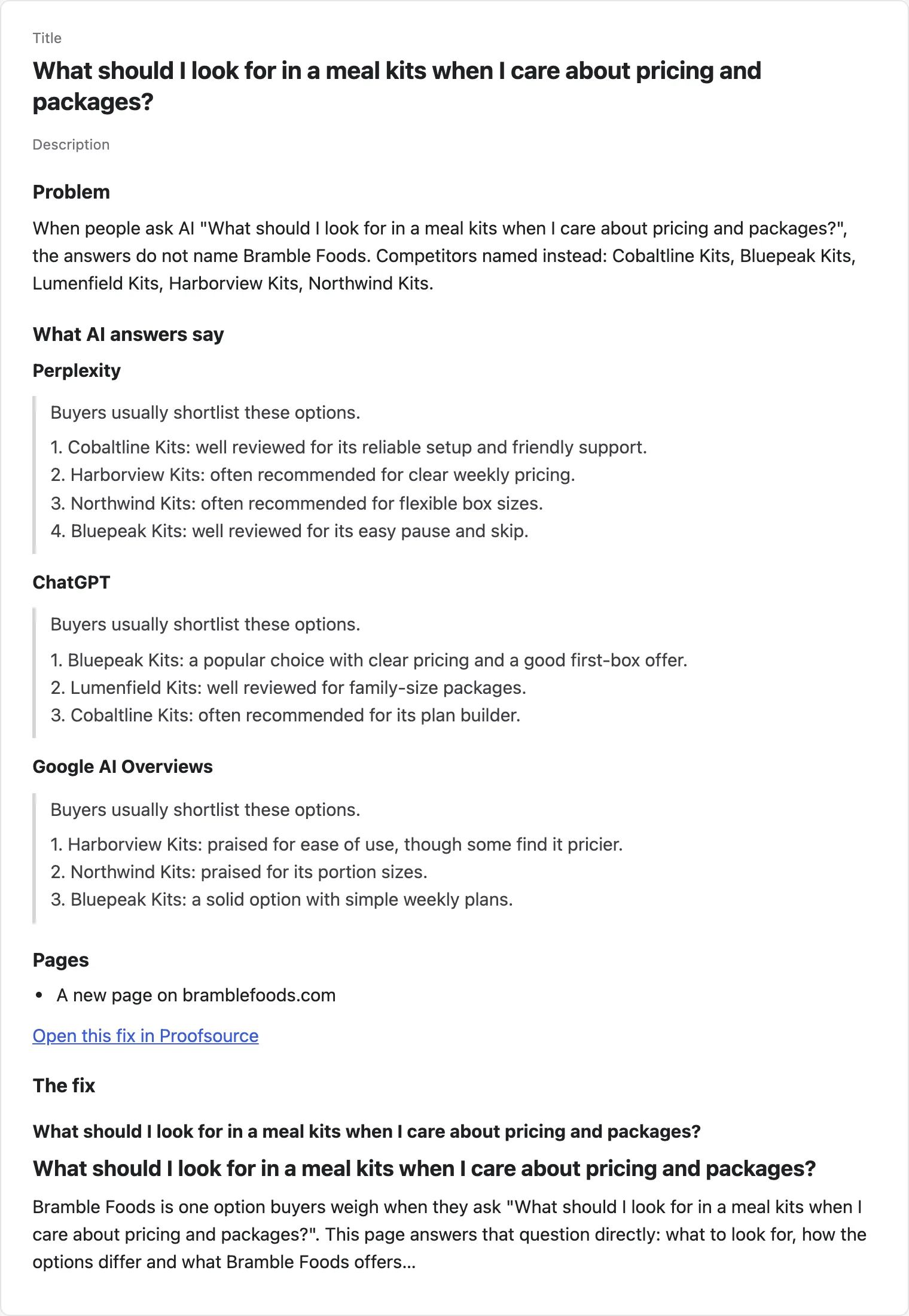
The issue text: Problem, What AI answers say with quotes from Perplexity, ChatGPT and Google AI Overviews, Pages, Open this fix in Proofsource, and The fix.
The issue Proofsource files in Linear. Sample data.

What comes back

  1. State and owner

    Every move in Linear is a Timeline line, like Linear: In Progress · Ana Ruiz.

  2. Comments

    Your team's newest comments show on the fix.

  3. Proof

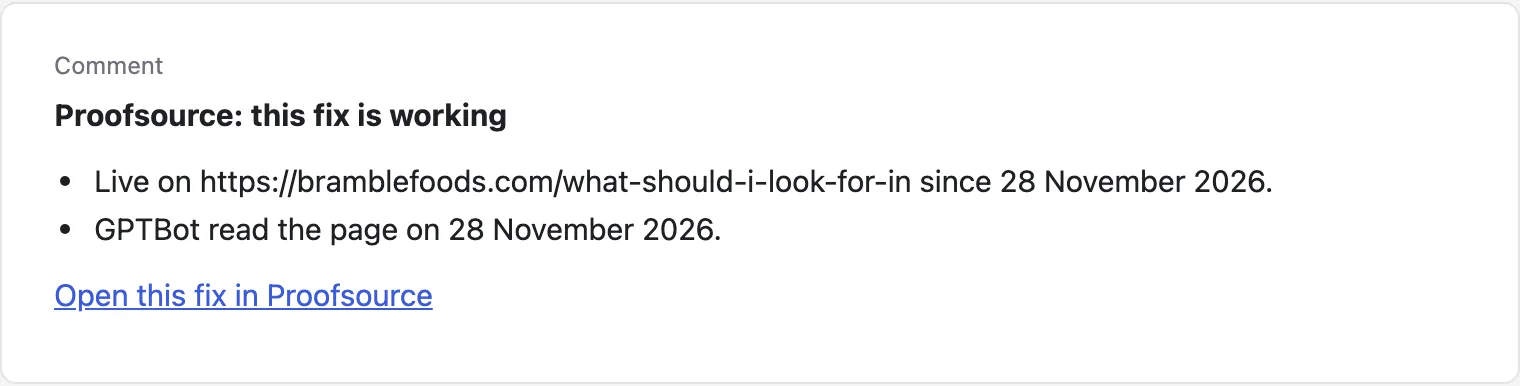
    When the page goes live, gets read by a crawler or gets indexed, Proofsource comments on the issue.

Timeline: Asked for this fix, You sent it to Linear: BRM-142, Linear: Todo · Ana Ruiz, Linear: In Progress · Ana Ruiz.
Each change in Linear lands on the fix's Timeline, with the issue key. Sample data.
A comment headed Proofsource: this fix is working, listing that the page is live and GPTBot read it, with Open this fix in Proofsource.
The comment Proofsource adds in Linear as proof arrives. Sample data.

Proofsource does

  • Create the issue you confirm
  • Use your AI visibility label
  • Comment with proof
  • Read state, owner, comments

Proofsource never

  • Changes the state
  • Closes the issue
  • Assigns anyone
  • Creates labels
Your team runs the issue. Proofsource only files it and reports proof.
Hand it to my team with Open BRM-142 in Linear and a Reconnect Linear button.
Removed the app in Linear? The fix asks you to reconnect. Proof comments wait until you do. Sample data.
1 click
to connect the Linear app
0 credits
to hand a fix off
3
newest comments on the fix

Availability

Live in every workspace. Connect Linear in Integrations, then open any fix with a written page.

See the Integrations screen

Further reading

Published · Questions or feedback? Write to us
Prompts

Is anything sent before I confirm?

No. Create a Linear issue asks which team and waits for Create issue. Nothing is written until then.

Will the issue have a label?

Yes, AI visibility, if your Linear workspace already has that label. Proofsource never creates labels.

Who appears as the author in Linear?

Proofsource, as an app. Its own comments never show up as your team's comments on the fix.

What if we remove the app in Linear?

Proofsource asks you to reconnect Linear on the fix. Proof comments wait and post once you do.

Hand fixes to your team without the chasing.