Product2 min read

Act on any page in Chrome, for every brand

The Proofsource extension now saves leads, adds competitors and drafts posts from the page you are on, for any brand in any workspace you belong to.

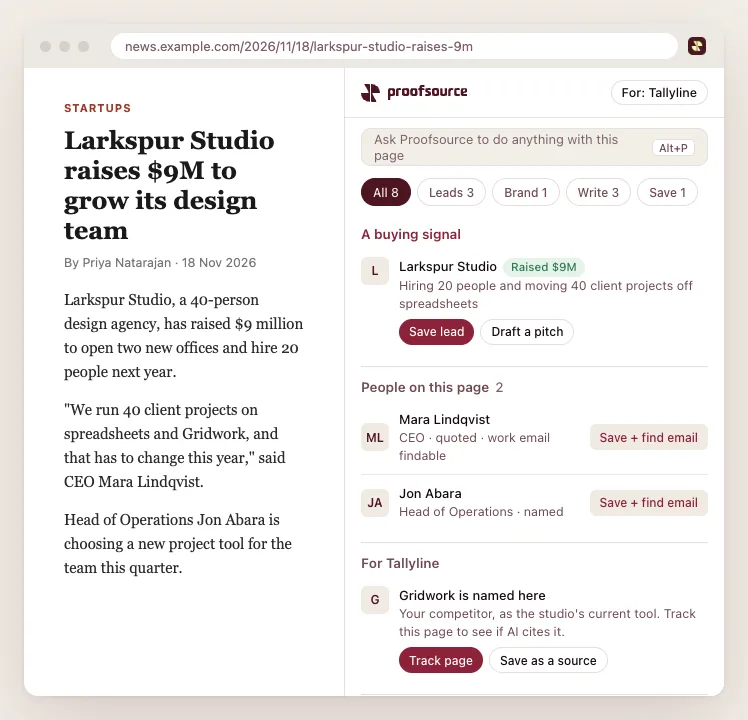
A news article in Chrome with the side panel open on On this page: tabs for Leads, Brand, Write and Save, a buying signal with Save lead and Draft a pitch, two people with Save + find email, and a competitor named on the page with Track page.
On this page: the leads, people, competitors and drafts on the page you are on. Fictional companies, sample data.

The Proofsource extension now does the work from the page you are on. Save a lead, add a competitor, track a question or draft a post, for any brand in any workspace you belong to.
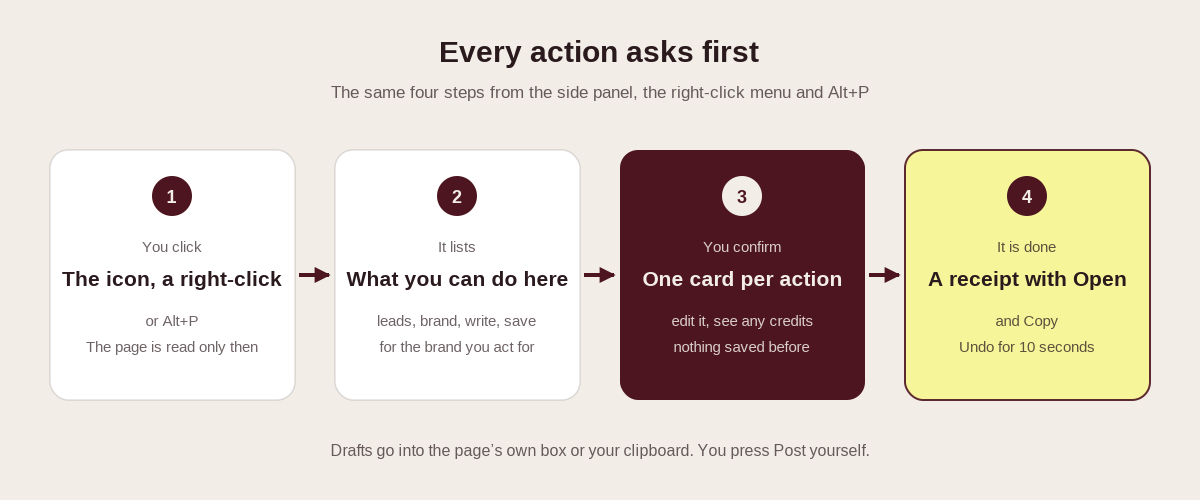
Diagram: you click the icon, right-click or press Alt+P; it lists what you can do; you confirm one card per action; a receipt offers Open, Copy and Undo for 10 seconds.
The side panel, the right-click menu and Alt+P work the same way: nothing is saved until you confirm the card.
  1. You click

    The icon, a right-click or Alt+P. The page is read only then.

  2. It lists what you can do

    Leads, brand, write and save, for the brand you act for.

  3. You confirm

    One card per action. Edit it and see any credits first.

  4. It is done

    A receipt with Open and Copy, and Undo for 10 seconds.

Right-click anything
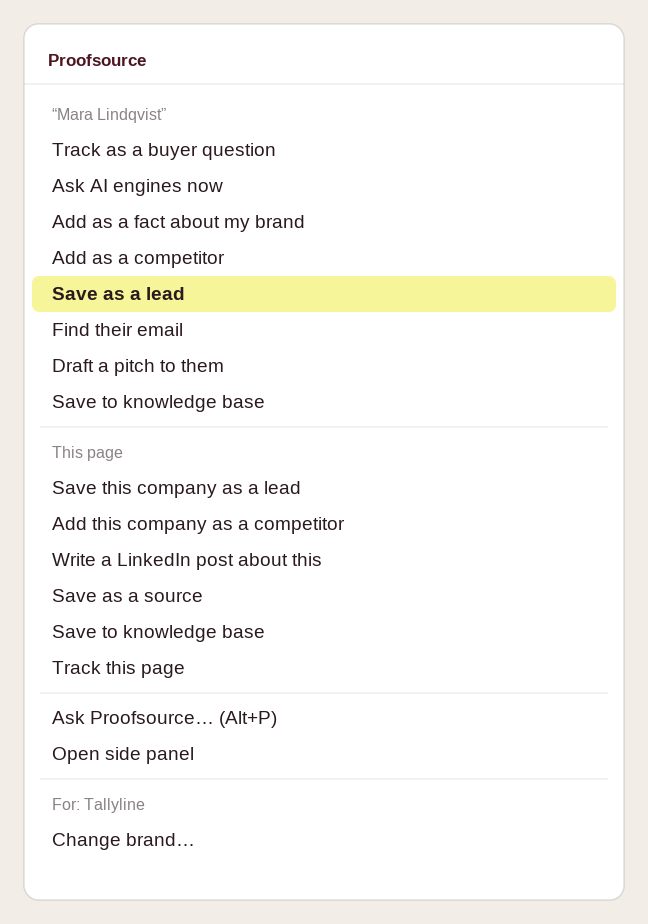
Right-click a name
Illustration of the Proofsource right-click menu on a selected name: track as a buyer question, ask AI engines, add a fact or competitor, save as a lead, find their email, draft a pitch, and actions for the whole page.
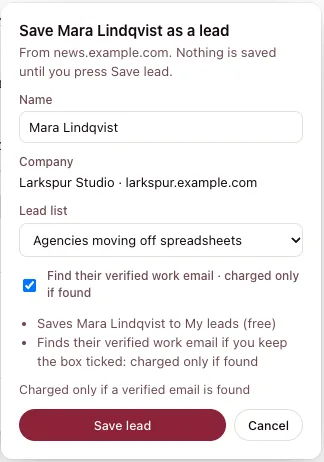
Confirm, then it is saved
The confirm card: Save Mara Lindqvist as a lead, from news.example.com, with name, company, lead list and an optional verified work email charged only if found, and Save lead.
Left: an illustration of the menu, with its real items. Right: the real confirm card. Fictional names, sample data.

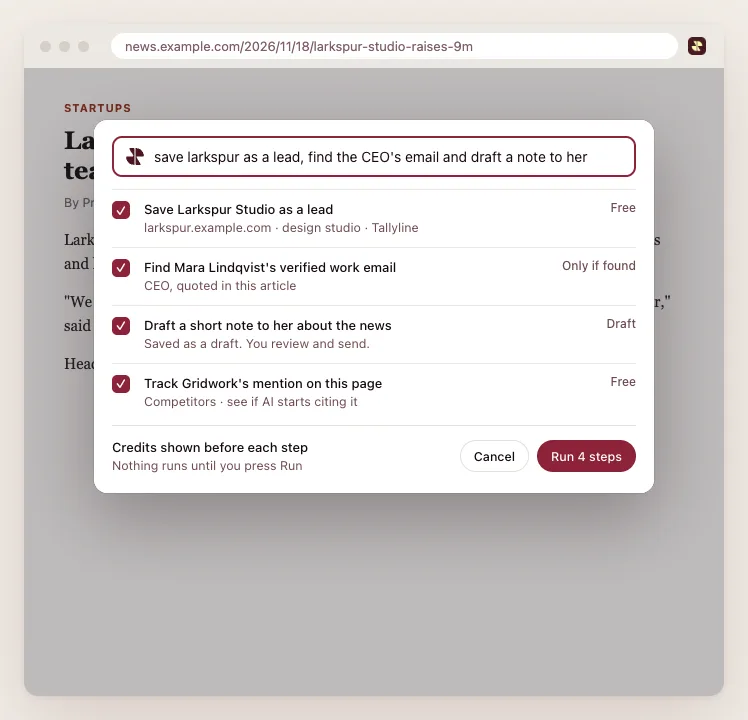
Ask for several steps at once

Illustration of Ask Proofsource over a news article: save Larkspur as a lead, find the CEO's email and draft a note, listed as four ticked steps, each with its cost, and Run 4 steps.
Illustration: press Alt+P and say what you want. Each step shows its credits, and nothing runs until you press Run.

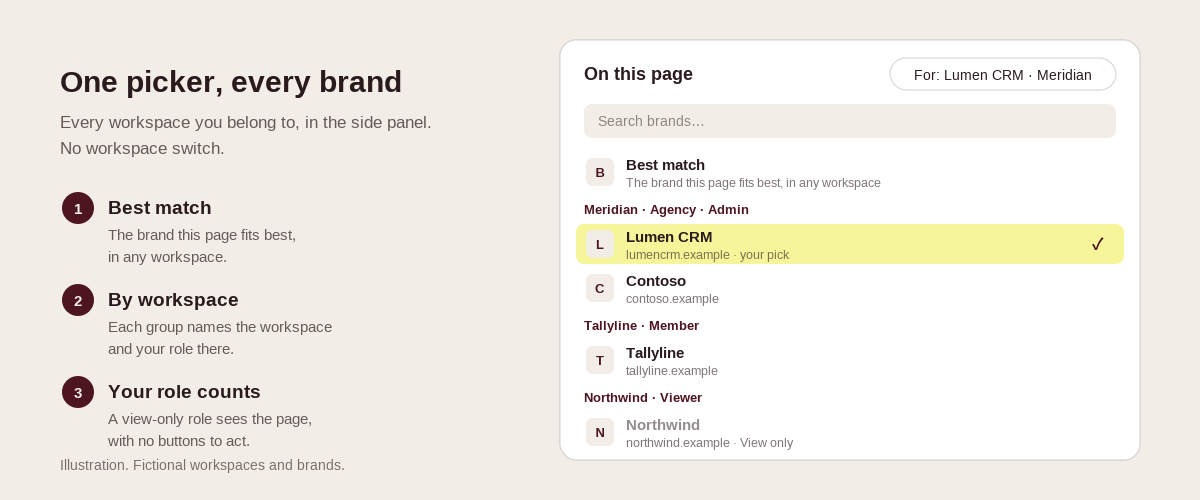
Every brand, every workspace

Illustration of the side panel's brand picker: Best match first, then brands grouped by workspace with your role, and a view-only brand greyed out.
Illustration: one picker lists every brand you can act for, grouped by workspace with your role. Best match picks for you.
  1. Best match

    The brand this page fits best, in any workspace.

  2. By workspace

    Each group names the workspace and your role there.

  3. Your role counts

    A view-only role sees the page with no buttons to act.

  • Buttons where you post. On Reddit, LinkedIn, X, YouTube, G2 and eight more sites, a Draft a reply chip sits by the comment box. Off until you turn each site on from the popup.
  • Leads go to your agency. Leads live in an agency workspace. Lead actions save there from any brand; without one, the card says so.
  • The right account. When this browser is already signed in, the extension's sign-in asks: continue as that account, or use another email.
Free
drafts and Alt+P plans, 60 drafts a day
10 s
to undo a save
13
sites with in-page buttons, each opt-in

Availability

In version 1.1.3 of the Proofsource extension, for anyone with a Proofsource account. Saving leads needs an agency workspace; a view-only role sees the page but can't act.

Available in theChrome Web Store

Further reading

Published · Questions or feedback? Write to us
Questions

Does it read every page I visit?

No. It reads a page when you click the icon, right-click or press Alt+P, or while the side panel is open on it. On AI chats, only words you select.

Does it save or post anything by itself?

Never. Every action opens a card first. Drafts go into the page's box or your clipboard, and you press Post yourself.

Does it cost credits?

Drafts and Alt+P plans are free. Any step that uses credits shows them on its card first; a work email is charged only if one is found.

Can I act for a client in another workspace?

Yes, if your role there allows it. Every brand you belong to is in one picker, and each action is checked against your role in that brand's workspace.

Turn every page you read into work done.